16. November 2019 · Write a comment · Categories: Uncategorized

I use Windows Live Mail 2012 because Window 10 Mail is a piece of **** compared to Live Mail 2012.

Anyway just now I rebooted my PC running Windows 10 and when I tried to sign into Windows Live Mail using my Hotmail Account it gave a message "sorry, there was a problem signing you." nothing else.  I went to Windows 10 Mail app and it works OK (even though I refuse to use it).

Windows 10 is all patched up and everything else on the PC is working fine.  I just can't sign into Live Mail 2012 using my Hotmail Account.

Anyone else having this problem or anyone know how to rectify it? 
15. November 2019 · Write a comment · Categories: Uncategorized

I was able to hold the control key and use the scroll wheel on my mouse to increase or decrease the text and now it won't work.  Using the same method in a browser works so I know there's nothing wrong with the mouse.  Does anyone have a fix for this? I'm using windows 7.

Thanks in advance.

15. November 2019 · Write a comment · Categories: Uncategorized

(This was previously posted under the wrong Community/Category)

Yeah, yeah, I know; I should migrate to another mail client, but I like WLM, which has definite advantages over the mail utility supplied with Windows 10, and is so less bloated than Outlook.  Mozilla's Thunderbird is a close contender, but it seems about as poorly supported at WLM.

I ran WLM 2012 under Vista without issue.  But under Win 10 it exhibits some strange behavior under certain circumstances.  I've learned to clear all the deleted messages and now close the program before formally shutting down or restarting the computer, but every time Win 10 'hiccups' or there's a power glitch, I reopen WLM and find that a good number of recent messages have lovingly been recategorized for me.  The bogus entries show up as new (boldface) Inbox messages without an account ID (I run three POP/SMTP accounts under WLM), and with quotation marks around the From column entries.  Many of these messages had been safely tucked away in their proper mailboxes as 'read' before the unexpected shutdown, and the corresponding POP/SMTP Webmail accounts had been purged of these emails.  So the messages are not really incoming or new ones, just removed from their recent storage locations and put back as new Inbox entries.  This applies to incoming and sent messages, both reappearing in the respective Inboxes.

I suppose all this is academic as chances of a fix are ludicrously less than slim-to-none.  But if this behavior is indicative of some bigger issue, I'd sure like to know it.

15. November 2019 · Write a comment · Categories: Uncategorized

Unable to access my mail in Windows Live mail as it keeps saying it does not recognise my password.This password has not been changed, and is the same as the password I use to access my Sky email account where I can still read my mail.I have tried at least 10 times to reset the password on the servers box but to no avail.This happened about 6 months ago for no apparent reason.On that occasion it rectified itself,but that has not happened this time.Please help?

Regards,

Greig.

15. November 2019 · Write a comment · Categories: Uncategorized

Movie Maker videos producing stalling or black videos

<mod removed>

14. November 2019 · Write a comment · Categories: Uncategorized

I recently had an email account that I access via Live Mail hacked.  In working through that issue, AT&T tech support had me remove my Live Mail account name and add a new/replacement one.  She stated that this would not impact the inbox and sent box in Live Mail, but unfortunately, that was not correct and they are now empty (except for the last few days which have repopulated).

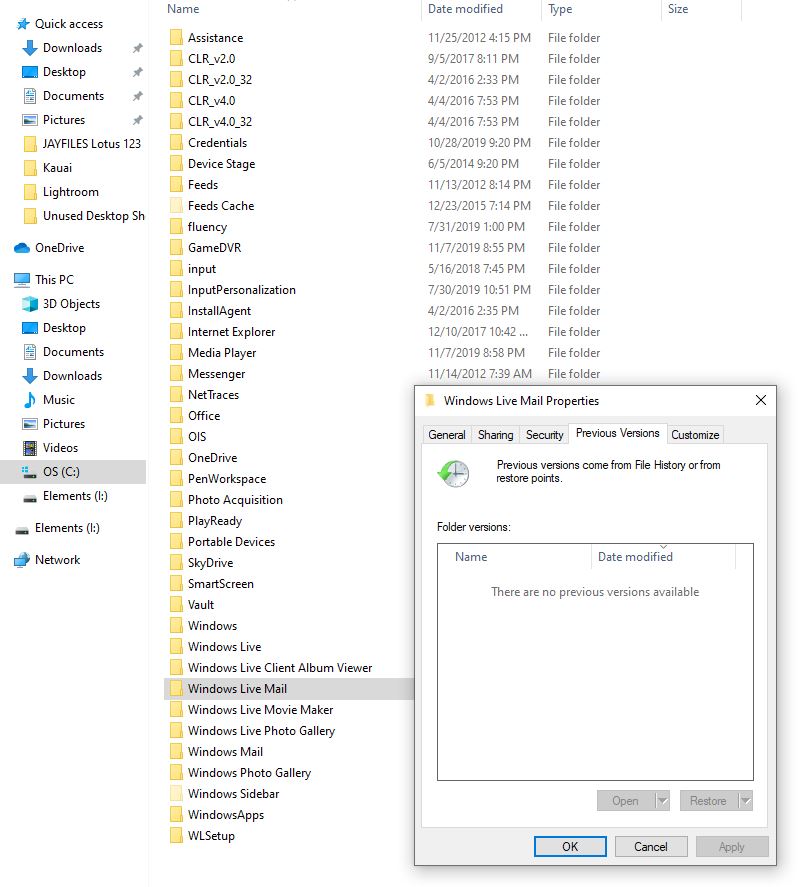
Is there a way to restore the inbox and sent box that were tied to the previous account?  I have attempted to go into the Windows Live Mail folder to restore to a previous restore point, but it tells me that there are no previous versions (screen shot attached).  I suspect the files are still there, but I need a different way of accessing them.

I try to backup the folders regularly, but my last backup is July 30 and I have some emails that I really need from within the last three months.

Thank you.

14. November 2019 · Write a comment · Categories: Uncategorized
I am aware of going to Photos and clicking the import button, I am aware of going through My PC. But it appears the computer does not even recognize that there is an iPhone attached. The phone is charging between the multiple cords I've tested but to no avail. Do I need to download iTunes?
13. November 2019 · Write a comment · Categories: Uncategorized

I'm one of the folks who loved/s WL Photo Gallery and have used it to catalog thousands of family photos along with facial recognition of all of the folks in them.  I've noticed that for some time now, even though I am logged in, it no longer shows my MS account profile picture and full name in the upper right hand corner.  It only shows the user icon and my email address.  When I identify myself in a photo I've always used the "That's Me" feature and that still works but when adding the name it only uses the first part of my email address.  I've tried re-downloading Windows Essentials and re-installing Photo Gallery as well as updating my MS account profile but nothing has had any discernible effect that I can tell.

I don't know when this started so I can't correllate it to anything else like going from Win 7 to Win 10 or a particular release of Win 10 -- I just don't know.

Is this something that I'm going to have to live with or is there something I need to do to re-enable the display of my profile picture and name inside Photo Gallery?

Thanks in advance for whatever help you can offer.

Howard

Redmond, WA

13. November 2019 · Write a comment · Categories: Uncategorized
Hi I am having an issue opening my windows live mail. It keeps asking for my password. It is not accepting the password and I have tried changing it in the settings but no luck. I would greatly appreciate some help with this issue. 
13. November 2019 · Write a comment · Categories: Uncategorized
I tried to Print my TurboTax file in a PDF format and it comes out in code. HELP