My W-10 and Live Mail have worked satisfactorily for several years until the end of Tuesday 17th, when the PC was shut down overnight as usual. Wednesday morning it refused to accept my password for sending and receiving, with the usual 0x800CCC90 and 92 errors. Nothing had been changed (AFAIK) and BT webmail access with the same password works as it should.
I would like to continue with Live Mail if there is an easy fix, or a convincing explanation for this anomaly. If not I shall just abandon it, like many other obsolescent software :-)
I have been using WLM for a long time, unable to received or sent email -error code 0x800ccc92. Using windows10 / WLM2011
Please tell me how to resolve this error / not recognizing my user name & p/w. Please advise.
Yes, I know there's an "improved" version of WMM in the Photos app, but I'm very used to WLMM. I've been working on a stop motion project for nearly a year and I've saved it countless times. It's only when I attempt to save the project that it tells me something is corrupted, like it says everything is fine before hand. I've tried scrolling slowly, reinstalling multiple times, pretty much everything I can think of! Please help!
My laptop has specs more than competent to run WLMM well, including an i7 8th gen processor and 12 GB RAM, along with AMD Radeon RX Vega M graphics...
What doesn't help is that the images that WLMM chooses to be corrupt is different every time, so I can't pinpoint an exact frame that's corrupted. I have the prepare files setting on, but that doesn't seem to be helping. I have the render settings set to a custom 1080p 60fps setting.
Hi,
On my Windows 10 system with an old Intel G33/G31 Express Chipset, Movie Maker has a distorted display with mirror images. I've attached a screenshot.
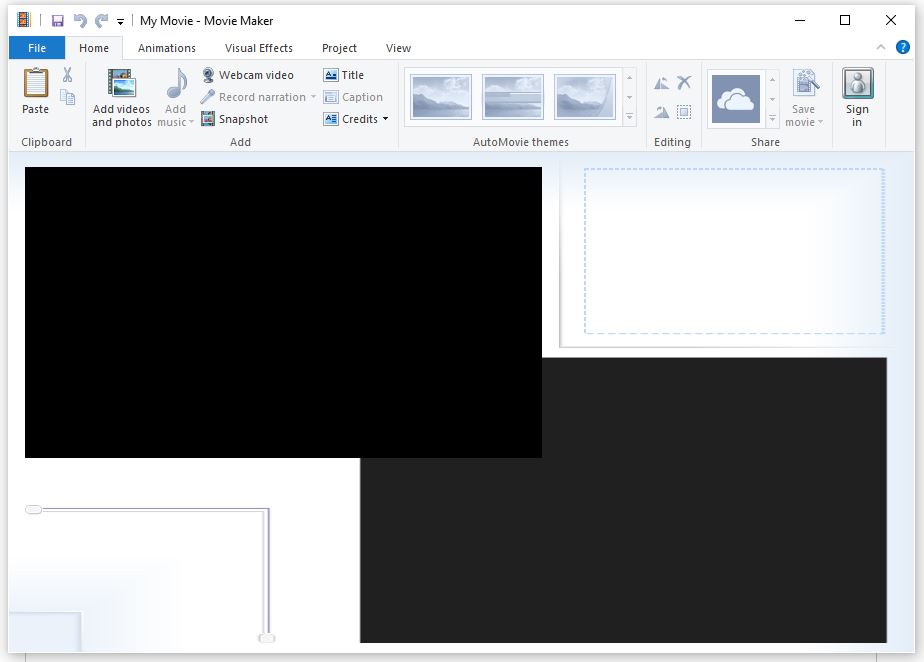
This is the same issue discussed at https://answers.microsoft.com/en-us/windowslive/forum/all/did-the-latest-microsoft-windows-update-make-movie/dcd82761-de89-4ec8-898f-646c00fb9860?auth=1&page=2, which is now locked without a solution. It's likely the same issue that users encountered with Windows Live Mail, as discussed at https://answers.microsoft.com/en-us/windowslive/forum/all/windows-live-display-problems/68c7e773-3889-40ec-9369-604c0a3a7b55?auth=1 and https://answers.microsoft.com/en-us/windowslive/forum/livemail-program/display-anomalies-following-update-to-windows-10/df1e5f40-b05a-4120-895a-2fca511ac6a4?messageId=7c2da666-e3a9-4078-9f21-c452dfe3de5d&auth=1.
For Windows Live Mail, a solution was shared in the last link above that restored the d3d10level9.dll from Windows 10 Version 1709 into a Windows Live Mail program directory. Movie Maker doesn't have its own copy of that DLL that I could find. I also don't have Windows Live Mail installed, only Movie Maker.
I've tried Intel's Driver & Support Assistant, but I'm already on the latest drivers and didn't find a solution to this problem.
It sounds like buying a new video card would likely avoid this problem, based on comments in the other discussions, but short of doing that, any ideas on how I might restore Movie Maker to its former level of functioning?
I'm happy to share additional system info if helpful.
Thanks.
-mike
p.s. The Movies & TV app in Windows 10 has the same mirror effect issue playing some vertical videos. Windows Media Player continues to play them fine.
Recent Comments