26. August 2020 · Write a comment · Categories: Uncategorized

Hi all, 

I have recently reinstalled the Mail and Calendar app since they were crashing. I do not know (remember) how one of my "Yahoo" accounts ended up there, where it can be seen in Mail and Calendar apps but not in the Settings below the Accounts section. 

In short: 

I can not remove it, when I click on it, a small window pops up and closes immediately. I can not find it in Settings > Accounts. 

How to remove or fix this account? 

26. August 2020 · Write a comment · Categories: Uncategorized

Since Windows 10 on my PC was automatically up-graded about 10 days ago Windows Live Mail has stopped working.  How can I restore it?

26. August 2020 · Write a comment · Categories: Uncategorized

Hi!

I'm using windows movie maker 2012 on windows 10.

with the movie maker while viewing on full screen suddenly a black screen appears and no audio too.

When going back to the timeline and resuming the full screen view- the sane clip previously showing black screen- views perfect.

It happens with different clips every time.

Please help

Aharon

25. August 2020 · Write a comment · Categories: Uncategorized
I typically like to have my emails in a list without sorting them into folders. However, in order to view them without searching them, I now have to set up folders so I can keep record of them. I would like for me to just have to scroll downwards and find the email, instead of searching for it that rarely finds it. 
25. August 2020 · Write a comment · Categories: Uncategorized

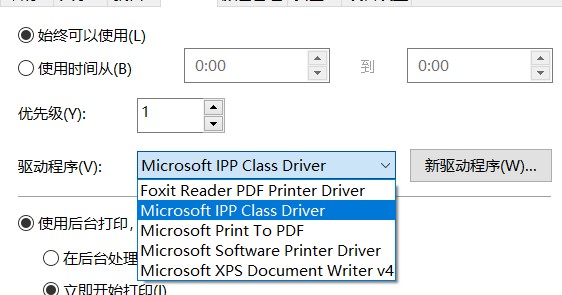
I use cups set up a network printer. My laptop can use it well, but my PC can't use it. I look at the printers driver, my laptop use ht microsoft ipp class driver, but my PC can't find this dirver. How can I solve the problem?

my laptop's driver look like this:

25. August 2020 · Write a comment · Categories: Uncategorized

Hi,

I would like to change my secondary email address linked to my Microsoft email address.

Can someone please tell me how to proceed?

Thnk a you

SJay

24. August 2020 · Write a comment · Categories: Uncategorized

I am extremely frustrated with this software. I had tried to create something with video, photos, and music. The videos ended up not working, so I removed them and just did a plain picture with music slideshow. I have done this before using movie maker, and it worked just fine. My photos are JPGs, which I know work with movie maker. When I went to go save my "movie", I got this pop up:

There are missing or unusable files in your Movie Maker project that are preventing your movie from being saved. Please check that file preparation is enabled in Options, or remove the files and try again. Error: 0x887A005

Can anyone help me save my movie?

24. August 2020 · Write a comment · Categories: Uncategorized

I am aware of the instructions to open file->option->mail->connect->stop signing in

"Stop signing in" is greyed out and not operative on my PCs. I want to archive Windows Live Mail and just keep its files without connecting to the internet, and without error messages every time I start it. I removed passwords, but Live Mail still tries to open accounts when it is started even though everything applicable is turned off.

My provider does not support any mail service other than their own. When connect Live Mail has frequent error messages and cannot display messages. I am certain Outlook works, but they do not provide support for that either. All settings for Live Mail are as prescribed by the provider. I am able to use the browser-based mail service of my provider. I do not want to use Outlook.

Is there something in the register which I can change to prevent Live Mail from connecting?

the results of my incorrect and change every one or three days as well as some dasapointments desapaer in outlook. do you have a procedure to avoid this problems 
24. August 2020 · Write a comment · Categories: Uncategorized

I tried for help in the skype forum, but was suggested to ask in this forum as I got no help...
My issue is with Windows live mail, and skype (i think), when logging into my Microsoft account in WLM, it pull's in contacts that no longer exist in skype.
I have deleted all contacts in skype, and for some reason, WLM pulls in over 20 contacts , and alot of them cannot be deleted, the DELETE is greyed out.

Can someone please suggest how to get rid of these contacts?

I'm guessing there's a hidden file somewhere stored on my drive with this info stored in it... 
I tried uninstalling WLM, and completely deleting all files in users/(username)/Appdata/Local/microsoft/Windows Live mail/
then reinstalling WLM, and then logging into my MS account in WLM, and the same contacts come back.
And these contacts DO NOT exist in my "Peoples" contacts on my MS account.
There's one contact that says "echo123",  Echo/ sound test service.
I don't use skype, and Just trying to get rid of all association with it...

thanks in advance for any help!

Frank

[Moved from: Outlook.com / People and contacts / Adding and managing contacts and groups]