I have added other users to my account. How do I verify, with Microsoft, the names of the people who are signed in using my subscription?
I have a gmail account on WLM 12. I know for sure my username and password for my google account. "The server has rejected your login" has been the only response from WLM. I can get my gmail from gmail.com but it won't download into WLM 12. Please
help. I've got a computer demon.
how do I stop my photos showing on screen when not using computer as I do not want them displayed on my windows 10 pro when I walk away from computer for ten minutes etc
Where can I get the download for windows live mail 2012? Mine got deleted when I removed another app.
We have Windows 10. When I try to access Windows Live Mail 2012, it fades to a blue screen with a message, "Your PC ran into a problem and needs to restart. We are collecting some error information and then we'll restart it for you"
This has been going on for about 3-4 hours.
It might be a concidence that earlier in the day, I updated my McAfee subscription for another two years. soon after that, the problem started with access to Windows Live Mail 2012.
What can I do to regain access? My e mail address is *** Email address is removed for privacy ***
2 emails get deleted some time when I click on "delete" in Windows Live.Sometimes, when I delete a message in the inbox, it deletes the following message, also. The following message may be read or unread. Why?
Hi Community Team,
I have explained the problem in Chat Reference 1466569393.
I have 6 signatures in Windows Live Mail 2011. I am trying to delete one. If I go to Options - Mail - Signatures, the list only shows one signature - the default one. I can still insert the various signatures in e-mails, but one of them is faulty and caused the program to crash and since then the list in Options - Mail - Signatures (which used to show all the different signatures) now only shows the one. How can I fix this? I have tried repairing WLM with wlarp.exe which did not work.
When I used the repair program - wlarp.exe - it finished 100% but then showed error message "no internet connection - retry"
I clicked the retry box - but nothing happened that I could see. I restarted the computer, and Windows Live Mail works fine - except for the problem with the signature list.
Is there another way for me to delete one of the signatures ?
Thanks Folks.

Unable to send mails from windows live mail app, all the mails sending is moved to outbox folder
error:
Your server has unexpectedly terminated the connection. Possible causes for this include server problems, network problems, or a long period of inactivity.
Subject 'Fw: Shirley and Marcy'
Server: 'outbound.att.net'
Windows Live Mail Error ID: 0x800CCC0F
Protocol: SMTP
Port: 465
Secure(SSL): Yes
System configuration: windows 7 Home Premium
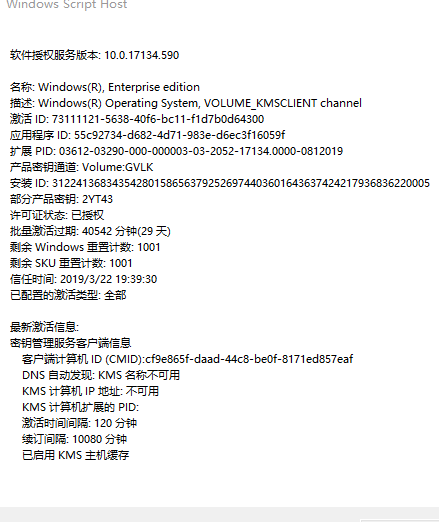
我目前在使用windows企业版,电脑 一天提示你的windows许可证即将过期怎么办啊?
Recent Comments