All my sent items have disappeared from my email account from december2017 to may 2018 including important photos included in the emails
John Craven.
All my sent items have disappeared from my email account from december2017 to may 2018 including important photos included in the emails
John Craven.
John Craven.
All my sent items have disappeared from my email account from december2017 to may 2018 including important photos included in the emails
John Craven.
John Craven.
Split from this thread.
Hi there,
Thank you for your explanation on things. I have a concern,
“Photo email will only be invoked if the files selected to be sent are image files, i.e. with the extension .jpg, .png, .gif or .tif (or possibly one or two others). If you include a non-image file, e.g. an empty text file with the extension .txt, the files will be attached to the new message in the traditional way. You can remove the superfluous .txt file before sending.”
If I understand correctly, attaching a .txt file will have sent all of the photos in the same folder? Will this still be the case even if the .txt file contains data (such as an older email)?
If this is the case, is there any way to revoke the privelages or somehow get the photos back?
The fact this is an issue to begin with is very disappointing. I noticed a grey box in a response email, and opened it up. I browsed the photos in the email, and it turns out the photos were not intented to be shared with the recipient to begin with.
Microsoft, please get this fixed.
I have been having trouble with this program crashing, and followed directions on the Microsoft website to uninstall. When I went to the link to reinstall, I found it is no longer available! Is there anywhere I can get this program?
Windows 10 updated and my Movie Maker is screwed up.
Can`t seem to get out of a 45 degree angle screen split.
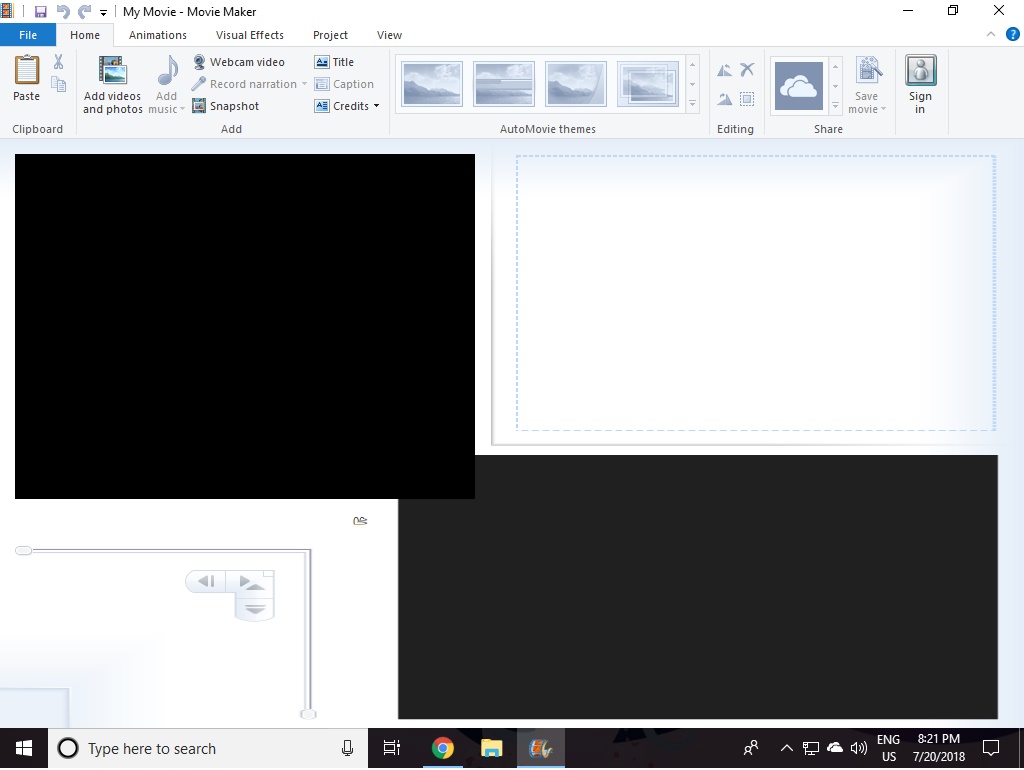
I hope you can tell me how
I use to see beautiful screen savers before signing in , I no longer get them ?
Hi I had bought a Micromax canvas LT777 a year ago & everything was going fine until yesterday the system asked for restart and it's in Black screen know unable to boot or unable to type pls help
Hi for the last two days- an message to verify email address has been constantly coming up umpteen times daily. I just X out. I am receiving emails.
but not sending Task (email address)@att.net - Sending' reported error (0x80004005) : 'The operation failed.'
Recent Comments