I have had the same problem with deleting email. Nothing seemed to work that I saw online. This worked for me, and hopefully will for others, too. And continue to work for me.
1. hit delete (which gets error message)
2. right click and select "open" (error message again)
3. hit delete (which now deletes the selected email) !!!!
I wonder if you could help me, please?
I am uploading files to my Onedrive. I noticed that pictures with .jpg .PNG .jpeg and possibly other extensions are being included in the Photos tab, even if they aren’t in the Pictures folder.
Is there a way to stop this? I want to keep the pictures (some are screenshots from my mobile, some are ones with an ex in them) but I don’t want them mixed up with all my other photos. If I delete them while in the Photos tab it deletes them off Onedrive.
I only want pictures stored in the Pictures folder to show in my Photos tab.
Many thanks.
how do I activate rules in live mail
[Original subject: windows live mail]
When I change the Live Mail Passowrd it changes my Microsoft account Password and not the Live Mail Password. Need help.
When I change the Live Mail Passowrd it changes my Microsoft account Password and not the Live Mail Password. Need help.
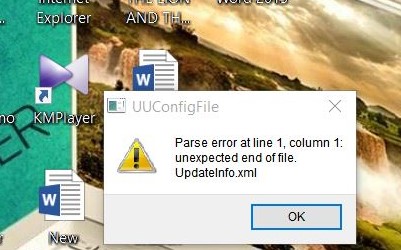 What
is this? It is not removed on my desktop & Problem to open my Internet Modem. What can i do?
What
is this? It is not removed on my desktop & Problem to open my Internet Modem. What can i do?
Recent Comments