25. April 2020 · Write a comment · Categories: Uncategorized
I was looking for service pk2 to run my brother DCP- 7040 printer scanner I was wondering were do I find this. I need it to run the paper port on my printer .
24. April 2020 · Write a comment · Categories: Uncategorized
On Windows 10  my Windows Live Mail Contacts folder is inaccessible, 2nd time it has happened. When trying to click on the "contacts" folder the computer will not obey. I can go to Calendar and Feeds and Newsgroups but nothing happens when I try to click on Contacts. But they are there and the computer autofills when I type in a name from contacts list. I managed to fix it once but don't remember how. I would like to get rid of Windows Live Mail because it is obsolete but don't want to do it while contacts are inaccessible. Anybody know what I can do? I am not a computer whiz but can follow clear directions. Thank you!
24. April 2020 · Write a comment · Categories: Uncategorized
How can I download windows movie maker from here and if not, in the new "Photos" is there an Apply to all options so I don't have to mess with each and every PHOTO!!!!!
23. April 2020 · Write a comment · Categories: Uncategorized

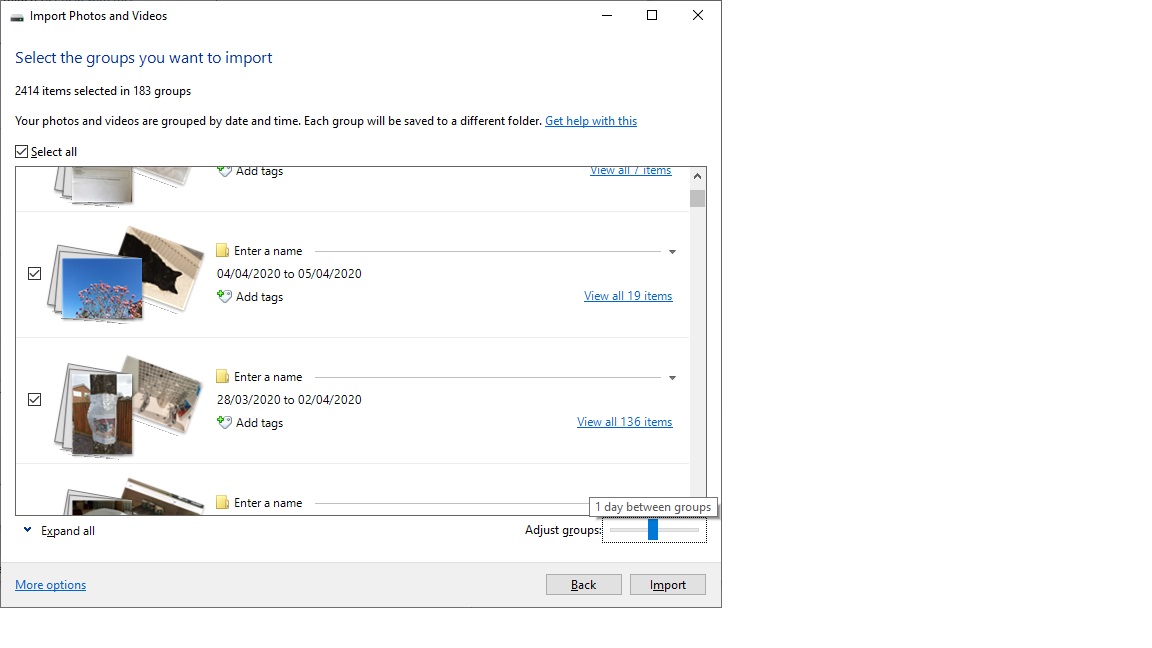
I have an issue with the photo gallery import, it works fine if it finds 'new' photos, but once i have started to import some, then the only option is to use grouping for the remainder, or if something went wrong on the first import and i had to be cancelled (removing photos uploaded).  then it no longer sees the photos as new, so i can only use the grouping option.  This used to work, but now for some reason, even though the adjust groups is set to 1 day between groups, the folders have multiple dates in them as shown in the screenshot.  If i make it less than 1 day it splits days by time, which i dont want. how do i resolve this so that each date a photo was taken has its own folder, and the files go in those folders??
23. April 2020 · Write a comment · Categories: Uncategorized
Does anyone know where I can find/install the feature to delete photos after importing?
23. April 2020 · Write a comment · Categories: Uncategorized
I am no longer able to delete photos after importing, the option no longer appears after connecting to my phone.  Never had this problem before and would like to get it back because this feature picks up hundreds of unnecessary pictures stored on my phone from ads etc. that do not show up in my gallery.  HELP!
23. April 2020 · Write a comment · Categories: Uncategorized

Hi,

My husband purchased small table (smart tab) for my daughter and proceeded to set it up. However, he created the login with an incorrect email that doesn't exist as he used her name @678yahoo.com, which is not a legitimate email provider. Now when he tries to log into the tablet, it's not allowing him to because he ALSO can't remember the password. :( We've tried to recover the password but it's sending the information to the bogus email. In addition, it's telling us that we aren't providing enough correct information for them to reset it online. So basically, we have this new tablet that we can't use. They are telling me now that we can pay to have the situation fixed and that service is actually more than the tablet. Any suggestions?

23. April 2020 · Write a comment · Categories: Uncategorized
The host 'shawmail' could not be found. Please verify that you have entered the server name correctly.

Subject 'test'
Server: 'shawmail'
Windows Live Mail Error ID: 0x800CCC0D
Protocol: SMTP
Port: 25
Secure(SSL): No
Socket Error: 11001
22. April 2020 · Write a comment · Categories: Uncategorized
HOW CAN I CREATE SUBTITLE FOR A VIDEO IN WINDOWS 10
21. April 2020 · Write a comment · Categories: Uncategorized
I work for the people with *** Email address is removed for privacy ***  they can send emails to me at *** Email address is removed for privacy ***. I can not reply or send to them. they do not get any emails from me.  Why? How do we fix this?  With COVID19 in the mix, communication is rather more difficult.