10. January 2018 · Write a comment · Categories: Uncategorized

Hi,

There is a problem with Windows Live Mail 'folders' option, in that sometimes(!) a name that resides inside another word e.g. if I choose to divert all emails with the 'From' line of 'cannabing' into its own folder, any other email name, such as 'Anna' is also sent to the 'C-anna-bing' folder. Another example to demonstrate the problem is when a name is included as part of another name, like 'Gemma' and 'Emma'. Emails from 'Emma' end up being diverted to the 'Gemma' folder

This causes emails to just disappear from the inbox when read, ending up in strange folders they are not meant to be in!

Can you please advise how to fix this?

Many thanks,

Mike

Moved From:  Windows / Apps on Windows 10 / Mail/Outlook Mail
10. January 2018 · Write a comment · Categories: Uncategorized

Bruce Hagen MVP was kind enough to suggest how to resurrect Win LiveMail via a link incl Web Archive.

I tried it yesterday and it kept saying it can't install if I am already installing something [which I wasn't but of course MS has superior wisdom].

But today the link worked and it started installing Windows Essentials 2012.

Gosh, I was overjoyed but sadly later in the process it gave up with a message it can't install and asked me to click a [try again] box.

I did, again with no luck.

So I'll try again or else change the browser from Edge to Chrome.

I thought, Bruce,  I'd let you know my adventures on reviving Live Mail.

10. January 2018 · Write a comment · Categories: Uncategorized
I have resized a batch of photos in Microsoft Live Photo Gallery, however it saves a copy of the image and appends the new size to the end of the file name. I want to resize a batch of images to either a) overwrite the original file, or b) make a copy of the image in a new folder with the same original file name. Keeping the file name the same is extremely important for what I'm looking to do.
10. January 2018 · Write a comment · Categories: Uncategorized

Hi there,

I created a new email 2 weeks ago and i add it correctely to Windows Live Mail, i use it only a couple of days to send some emails. when i create it I used a complicated password so unfortunately i dont remember it .. until yesterday all is good (all accounts on my WLM are sync and updated)

Today i opened WLM but i got a failed login for this new account , error code 800cccd1 , so i cant log into it (via browser or WLM) . I dont know if it has been hacked or the account has been disabled or deteted by Microsoft what. can you please give me the exact statut of my email address : *** Email address is removed for privacy ***

Thank you !

10. January 2018 · Write a comment · Categories: Uncategorized
Split from this unrelated thread.

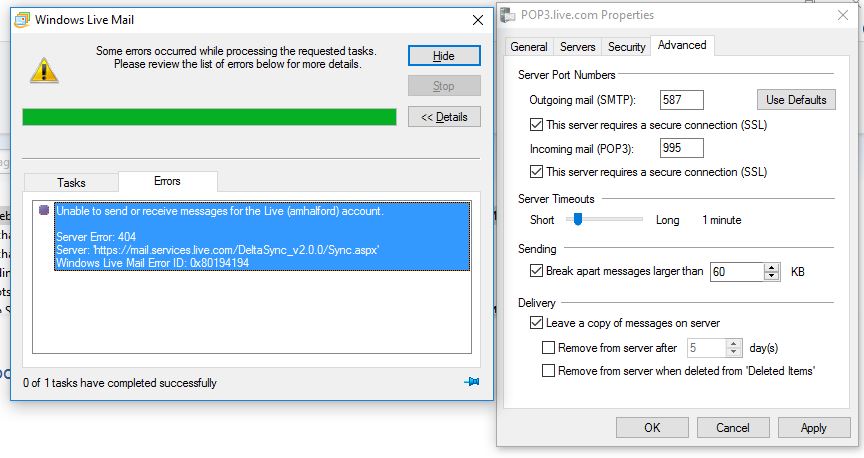
I have the same L.ve Mail build16.43528.0331 as CarlaBrunskill  . Dec. 30th, 2017 my Live account which had been working perfectly, suddenly stopped sending mail and gives the same screen message (see screen shot below) every time I open it.  Outgoing letters sit in the outbox and do not send.  I complained to Microsoft website.  I am receiving letters now, but still have to copy and paste an email into the Windows 10 Mail program (which I do not like) to send an email.

10. January 2018 · Write a comment · Categories: Uncategorized

I need help changing my old xbox live account from an adult account so my child can keep his achievements on certain games he's been playing, doing so I can use my other account as the parent account.

Thanks 

09. January 2018 · Write a comment · Categories: Uncategorized
I went to use Windows Movie Maker for a project, but when I looked for it, it had disappeared. I further researched this and it said it had been taken down. Does anyone know why? It really annoys me as this project is urgent. Thanks, I_askQs 
09. January 2018 · Write a comment · Categories: Uncategorized

Esse é meu problema não tenho permisão adissionais 

09. January 2018 · Write a comment · Categories: Uncategorized
Unable to send or receive messages for the Gmail (tonisyron) (1) account. Header download for the 'Inbox' folder did not complete. The operation was canceled by the user.

Server Response: WEBALERT https://accounts.google.com/signin/continue?sarp=1&scc=1&plt=AKgnsbtpqFzCOjwlHjesEMXNYj9S312TkuaSLw9U8WefWIy9biqeXAnyhRT2vGg09He-VXgm6xrTjSllJO7A_wITjLu6lrfCiYRuQibONb7HkGZOWAFdww7tnAhvX6w90PG4IQjO-rDNy7ZqA_IQ86ObHGPD3WrzDHTmDSmNIj8TkYUjovGIgNBI6oSTpXKdaDgESH3GDVuG7yovqohNenyOgkHDZClFys7Bi3KcxJBTRvYsNW1wTsQ] Web login required.
Server: 'imap.gmail.com'
Windows Live Mail Error ID: 0x800CCC0F
Protocol: IMAP
Port: 993
Secure(SSL): Yes

Error message above for gmail through windows live 2012.  It was working and still works on my mobile and tablet but through windows live has now stopped working.

09. January 2018 · Write a comment · Categories: Uncategorized
PHOTOS NOT OPENING SHOWING ERROR